The Computer Pipe Organ
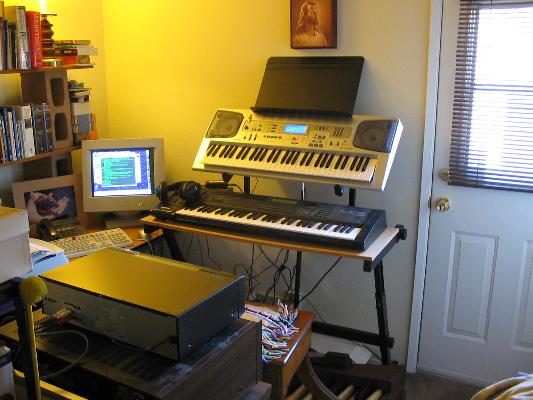
Hi! Welcome to the Computer Pipe Organ Page. This page describes my computer pipe organ, pictured below, that I built, piece by piece, over a period of time. This organ, in various stages of development, was used to record my musical performances which are available on the
O. P. Martin Home Page.
I have links to all the suppliers I used.
Also available from this page are the organ software I wrote and the soundfonts I use, in order to help you if you want to build one of your own.
The computer pipe organ consists of two 61-note keyboards, a keyboard stand, a piece of plywood, keyboard accessories, midi cables, a music stand, a 32-note ago pedalboard with midi, an organ bench, a midi merger, my home personal computer, my organ software, custom soundfonts, assorted audio cables, and two headphones.
I will not provide an introductory tutorial of organ or computer terminology, nor all the step-by-step instructions you would need to assemble your own variant of what I did, but here are some highlights and pointers:
Each manual on my computer pipe organ is an ordinary electronic keyboard / synthesizer which was/is readily available. The first one I originally purchased because I wanted a fine professional instrument with good sound. And, for a while, I used it to produce sounds. But, now it could just as well be a cheaper model since it is only being used as an input device for the computer. I chose the
Roland XP-60. The Roland
keyboards have one feature I like where the program-select buttons are laid out in two rows of eight buttons each. Each button in the top row selects a menu of eight programs which are selected in the bottom row, for a total of 64 programs that can be instantly accessed with the press of two buttons. I take advantage of almost all of these combinations in my software program, described below. I do not know what the least-expensive Roland model is that has this feature.
For the upper manual I purchased a far less expensive keyboard from
Casio. The Casio keyboards have the feature of being able to easily change the keyboard channel that they send midi data out on. I got the least expensive model that had velocity sensitivity, the CTK-593. It is ugly, but that is the price you pay. If your keyboard has built-in speakers, make sure the volume is all the way down.
The keyboard stand had to be carefully chosen since most of the modern models are not compatible with a full pedalboard. I got a wide, Z-type stand
by QuikLok, the Z-726L.
Because it was necessary to get the wide version so the legs would fit under the curved pedalboard, it was also necessary to get a 44x16x1/2" piece of plywood to support the 61-note lower manual.
I also got an expression pedal and a sustain pedal to hook to the Roland keyboard, a power adapter for the Casio keyboard, and several midi cables.
The music stand is a good old classic church-style model from
Manhasset.
They have been around since the 1930's.
It just fits when fully extended and sitting on top of a small cardboard box.
All of the above (keyboards through music stand) I purchased from my local
Sam Ash music store.
Because my organ technician friend had an extra pedalboard that he gave me, we were able to fix it up and midi-ize it for about half the cost of buying a new one. The midi circuit board or a complete midi pedalboard are available from:
Classic Organ Works.
Bear in mind that prices on this site are listed in Canadian dollars and the U.S. price is somewhat less.
The most difficult piece to acquire may actually be the organ bench. The bench must be wide enough to accommodate the full pedalboard. The Lord blessed me to pay only a fraction of what a new bench would cost by allowing me to locate a rare, used theatre-style bench, which has the narrow seat and the wide legs, which I needed because of limited space. You may be able to get by with a straight classical style. Either way, three resources to help you track down used organ pieces (in decreasing order of usefulness) are:
1. www.keyboardtrader.com,
2. barton.theatreorgans.com,
3. www.organclearinghouse.com.
If you must get a new bench, two suppliers are:
Allen Organ and
Organ Supply ,
but they are very expensive.
One thing Sam Ash did not carry was a midi merger. You need to merge three midi streams into one input port on the computer's sound card. Understand that each of the three midi devices must be set to transmit on a different midi channel. The pedalboard midi circuit card already boasted one merge input, so I was able to get by with a two-input merger from
Midi Solutions, although a four-input model is available. I was able to get this at a substantial discount from:
Musician's Friend .com .
I won't go into great detail describing the computer except to mention the sound card, which is important for the purpose of building the computer pipe organ.
The sound card must support the
Creative Labs soundfont 2 format, which are files with the extension .sf2 .
When we ordered my computer in 2001 to my exact specifications, I originally wanted the then-top-of-the-line Sound Blaster Live! card. But, the Live! drivers conflicted with the also-then-top-of-the-line video card I was getting, and I decided to back off one notch on the sound card, and got the SB PCI 512, which is almost as good as the Live!. Almost any reasonably-good, SB / soundfont - compatible sound card should suffice, but it should have as many voices as possible since organ sounds use a lot of them, and dedicated hardware is better than a software synth. I use the computer for many other things, but the organ is always ready to instantly respond whenever I choose to play a few notes.
My Organ software program that I wrote does not present fancy screen eye candy or allow you to play the organ with a mouse. So, the resource footprint is small. But, it does take input from as many midi input devices as you have so you can play organ in real time. It allows layering sounds from different soundfonts in the same preset. It stays on until you turn it off. And, when you turn it back on, it reloads all the defined soundfonts.
Each program-select button on the music keyboard translates into a general preset in my Organ software program. That is, the registration for both manuals and pedal are all instantly changed at the press of a button.
The list of presets is defined in a control file that can be edited with a text editor, and multiple control files can be switched in (one at a time) with the File / Open command of the Organ program. Also provided is the control file I personally use, which can be customized by the user if desired.
Here is the Organ12.zip [89k] file.
This software program has been tested on Windows 98 SE.
To use the program, create the folder "C:\Program Files\Organ12" and unzip the contents of both the above file and the soundfonts file, below, into it. If it doesn't work right away, you will have to read the documentation in order to change parameters.
The soundfonts I use were almost all originally downloaded from the
Hammersound web site, (which, as far as I know, is the best site for free soundfonts,) but then customized by me. There are about 43 classical ranks and 10 theatre, as well as some other sounds, including some sounds I made myself.
Here is the OrganSF12.zip [6.0M] file.
Here is an updated version of the organ program, Organ14, that was modified to run on Win XP, is intended to work with any sound card, and has a few new sounds.
Sorry, the documentation has not been updated to explain the new features, but at least there are working examples.
The file, Orgue138_Setup.zip [41M], includes the soundfonts, and all is bundled in an installer.
Tip: under Win 7, set the icon to run as administrator and in XP compatibility mode. Instructions here.
-
It works! You will also have to edit the SFLoad commands in Presets14.txt to reflect the new path by changing "C:/Program Files/..." to "C:/Program Files (x86)/...".
If you find the program useful, consider a small donation. The suggested donation amount is $5.
I also use the free MidiYoke program to route the midi output of one program (such as Organ14) to the midi input of others (such as a DAW). It too is an old program but it works under Win 7: just right click on the .msi file and select "troubleshoot compatibility" to install.
An 1/8" stereo audio extension cable and an 1/8" stereo Y-adapter were bought from my local
Radio Shack .
These are used to connect the output of the sound card to the two headphones. The main pair are the ones I use most of the time. I recommend them:
Sennheiser HD 570 Symphony headphones. These we got at
Crutchfield.
I just cut the bass by -3 dB and they sound perfect. They also feature a detachable cord and are extremely comfortable.
When I am playing for someone else, I let them use the good phones, while I listen with the second pair, which I got when Sam Ash threw them in for free for buying the second keyboard.
If you would like to hear some music I made with this computer pipe organ, my MP3 album, "Jesus, O Jesus II" is available on
CD Baby,
iTunes, and
Amazon, among others. Here is the
press release.